Think of your website as a magazine page. The main article area is your primary editorial feature story in the centre. Modules are the specialised insert boxes, sidebars, banners, and navigation panels placed around the edges of the page.
Consider this example webpage:
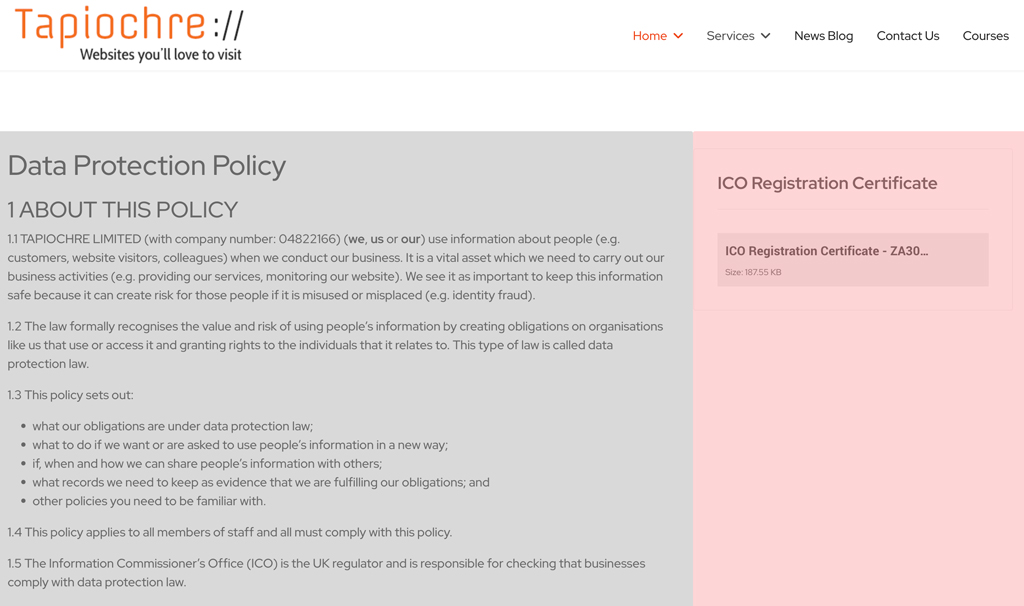
As we mentioned on the page related to articles, on a page like this, the right-hand column shown in pink contains modules.You can have more than one module displayed on any one page.
So, what is a module?
A module is a little feature used to display content or functionality in specific areas around your main page layout - most commonly on the right.
While your primary content area handles your main articles, modules handle the supporting elements that help users navigate or interact with your site.
Common examples of modules include:
-
Sub Navigation: A menu bar that helps visitors move across your site looking at page articles that are related to the page they are looking at.
-
Breadcrumbs: A trail indicating your current hierarchy level (e.g., Home > Blog > Article), often see above the main content of the page
-
Articles List: What's just like sub-navigation, showing a list of articles in your website which are associated to the one you are currently looking at.
-
Custom HTML: A flexible block used for raw text, images, or custom widgets.
Given that there are many different types of module that you can choose, and these are generally set for you automatically when your website is built, where do you start if you want to add (or change) a module to your site.